Path from Shape
| This is an experimental feature. See Enable Experimental Features. |
 CAM Path From Shape TC
- Menu location
-
- Workbenches
- Default shortcut
-
None
- Introduced in version
-
1.1
- See also
Description
The Path From Shape TC command creates a toolpath that follows selected edges directly, without tool radius compensation and without depth stepping. The toolpath is linked to a Tool Controller of the Job for feed rates and tool change. It is an experimental command.
This command replaced the earlier experimental From Shape (CAM_Shape) command in version 1.1; that command is no longer available from the menus.
The new PathShape object is added to the Job’s Operations and is post-processed like any other Operation.
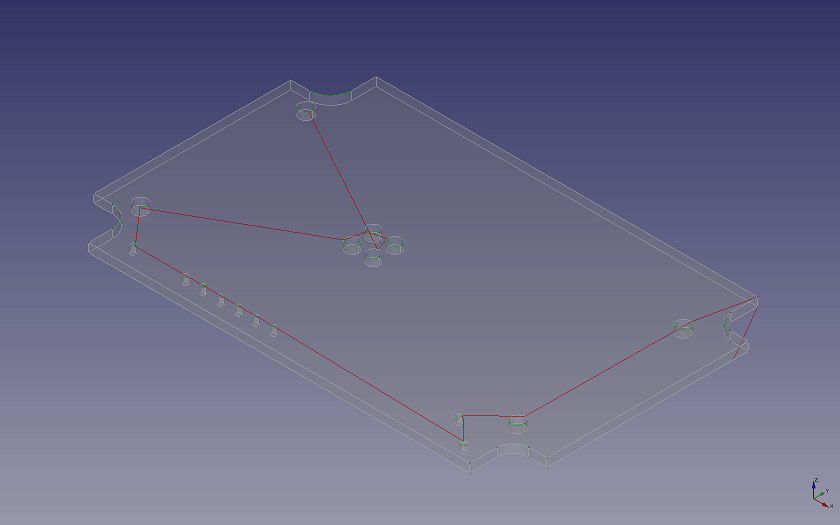
| This image predates the 1.1 Path From Shape TC command and may not match the current object. |
Usage
-
Select one or more edges of a model in the 3D View, or select an object whose shape is a single wire or edge (for example a Draft wire). Faces and whole solids are not accepted; only the first selected object is used. Finish Selecting Loop can help to select a closed loop of edges.
-
Select . The command is only enabled when a Job exists.
-
Adjust the Tool Controller, retraction and feed properties in the property editor (there is no task panel).
Objects created
The command creates a hidden helper object PartShape holding a wire built from the selected edges (its Base property links the edges; for a wire object a Draft clone is used instead), and a PathShape object of type Path::FeatureShape whose Sources property links the helper. Retraction, ResumeHeight and RetractThreshold are initialised to the Stock top plus 10 mm.
Options
All settings are edited in the property editor: RetractAxis, Retraction, ResumeHeight, RetractThreshold, FeedRate, FeedRateVertical (see Properties).
Properties
-
Sources (
LinkList): shapes to convert. -
StartPoint (
Vector): Feed start position. -
UseStartPoint (
Bool): Enable feed start position. -
ArcPlane (
Enumeration):None,Auto,XY,ZX,YZ,Variable— arc drawing plane (G17/G18/G19). -
SortMode (
Enumeration):None,2D5,3D,Greedy— wire sorting mode to optimize travel. -
MinDistance (
Length), SortAbscissa (Length), NearestK (Integer): sorting parameters. -
Orientation (
Enumeration):Normal,Reversed— loop orientation. -
Direction (
Enumeration):None,XPositive,XNegative,YPositive,YNegative,ZPositive,ZNegative— open path direction. -
RetractThreshold (
Length): end points closer than this are treated as connected (tool stays down). -
RetractAxis (
Enumeration):X,Y,Z. -
Retraction (
Length): absolute retract coordinate along the retract axis. -
ResumeHeight (
Length): pause height relative to the next move after a retract. -
Segmentation (
Length): break long curves into segments of this length (0 = off). -
FeedRate (
Float) and FeedRateVertical (Float): feed rates, initialised from the Tool Controller. -
Verbose (
Bool), AbsoluteArcCenter (Bool), EmitPreamble (Bool), Deflection (Precision). -
Active (
Bool), Comment (String), UserLabel (String), CycleTime (String, read-only), ToolController (Link), OpToolDiameter (Distance, read-only, group Op Values): added by the command.
Notes
-
The C++ commands From Shape (
CAM_Shape, creates aPath::FeatureShapefrom selected faces/edges/objects without Tool Controller) and Compound (CAM_Compound) are still compiled into the workbench but are not on any toolbar or menu; they can only be reached via or Python.
Scripting
See also: FreeCAD Scripting Basics.
The command has no Python API; the equivalent is to create a Path::FeatureShape object and set its Sources property. The low-level conversion is available as Path.fromShapes():
Path.fromShapes()
Returns a Path object from a list of shapes.
-
shapes: input list of shapes.
-
start (Vector()): feed start position, and also serves as a hint of path entry.
-
return_end (False): if True, returns tuple (path, endPosition).
-
arc_plane(1): 0=None,1=Auto,2=XY,3=ZX,4=YZ,5=Variable. Arc drawing plane, corresponding to G17, G18, and G19.
-
If not 'None', the output wires will be transformed to align with the selected plane, and the corresponding G-code will be inserted.
-
'Auto' means the plane is determined by the first encountered arc plane. If the found plane does not align to any G-code plane, XY-plane is used.
-
'Variable' means the arc plane can be changed during operation to align to the arc encountered.
-
-
sort_mode(1): 0=None,1=2D5,2=3D,3=Greedy. Wire sorting mode to optimize travel distance.
-
'2D5' explode shapes into wires, and groups the shapes by its plane. The 'start' position chooses the first plane to start. The algorithm will then sort within the plane and then move on to the next nearest plane.
-
'3D' makes no assumption of planarity. The sorting is done across 3D space.
-
'Greedy' like '2D5' but will try to minimize travel by searching for nearest path below the current milling layer. The path in lower layer is only selected if the moving distance is within the value given in 'threshold'.
-
-
min_dist(0.0): minimum distance for the generated new wires. Wires maybe broken if the algorithm see fits. Set to zero to disable wire breaking.
-
abscissa(3.0): Controls vertex sampling on wire for nearest point searching. The sampling is done using OCC GCPnts_UniformAbscissa.
-
nearest_k(3): Nearest k sampling vertices are considered during sorting.
-
orientation(0): 0=Normal,1=Reversed. Enforce loop orientation:
-
'Normal' means CCW for outer wires when looking against the positive axis direction, and CW for inner wires.
-
'Reversed' means the other way round.
-
-
direction(0): 0=None,1=XPositive,2=XNegative,3=YPositive,4=YNegative,5=ZPositive,6=ZNegative. Enforce open path direction.
-
threshold(0.0): If two wire’s end points are separated within this threshold, they are consider as connected. You may want to set this to the tool diameter to keep the tool down.
-
retract_axis(2): 0=X,1=Y,2=Z. Tool retraction axis.
-
retraction(0.0): Tool retraction absolute coordinate along retraction axis.
-
resume_height(0.0): When return from last retraction, this gives the pause height relative to the Z value of the next move.
-
segmentation(0.0): Break long curves into segments of this length. One use case is for PCB autolevel, so that more correction points can be inserted.
-
feedrate(0.0): Normal move feed rate.
-
feedrate_v(0.0): Vertical only (step down) move feed rate.
-
verbose(true): If true, each motion G-code will contain full coordinate and feedrate.
-
abs_center(false): Use absolute arc center mode (G90.1).
-
preamble(true): Emit preambles.
-
deflection(0.01): Deflection for non circular curve discretization. It also also used for discretizing circular wires when you 'Explode' the shape for wire operations
Example:
shapes = [Box.Shape]
Path.fromShapes(shapes, start=Vector(), return_end=False, arc_plane=1, sort_mode=1, min_dist=0.0, abscissa=3.0, nearest_k=3, orientation=0, direction=0, threshold=0.0, retract_axis=2, retraction=0.0, resume_height=0.0, segmentation=0.0, feedrate=0.0, feedrate_v=0.0, verbose=True, abs_center=False, preamble=True, deflection=0.01)