CAM PostSelected
Description
The  CAM PostSelected command (menu text: Post Process Selected; tooltip: Post Processes the selected operations) exports only the selected Operations of a Job to G-code, using the same Post-Processor flow as CAM Post. It is found in the menu, in the Project Setup toolbar drop-down Post process Operations, and in the Tree View context menu of Operations.
Usage
-
Select one or more Operations (or Dressups) of the same Job in the Tree View. The command is inactive if a Job is selected.
-
Invoke the command:
-
Press the
Post Process Selected button in the Post process Operations toolbar drop-down. -
Select the option from the menu.
-
Use the keyboard shortcut: P then O.
-
-
A Post Process message box asks What needs to be exported? — press Only selected to export just the selected Operations or All (default) to export the whole Job. The box is skipped when the selection already equals the whole workplan.
-
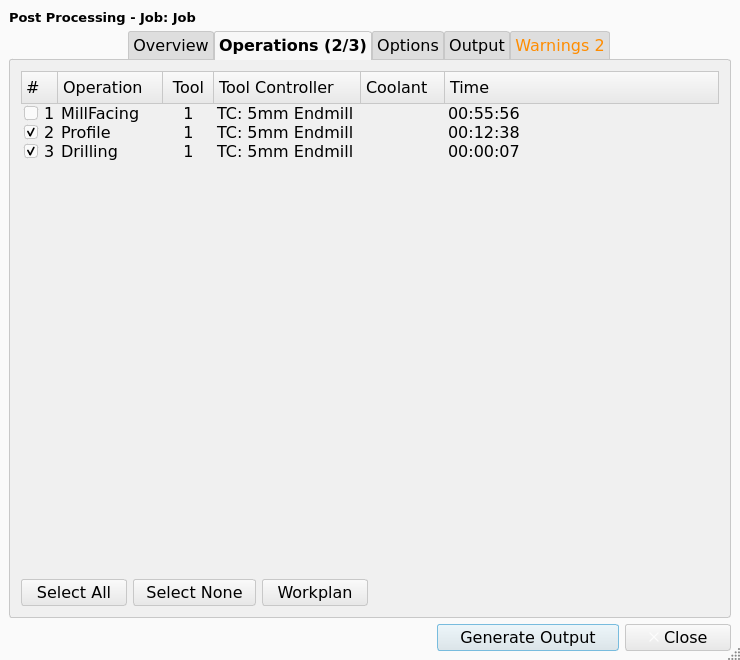
Post-processing continues as for CAM Post: the Post Processing dialog (Job with Machine) or the legacy flow; in the dialog the selected Operations are pre-checked on the Operations tab.
The figure shows the Operations tab for a Job with three Operations, after a press of Only selected with two Operations selected.
Notes
-
Check that the exported subset is safe to run without the omitted Operations (the message box reminds you).
-
Operations inside an Array with several Tool Controllers are resolved to their parent Job through the Array’s Base.
-
The Operations tab of the Post-Processing Dialog shows one row for each active Operation. The check box of each row is in the
#column. -
The Operations tab shows the columns
#,Operation,Tool,Tool Controller,CoolantandTime. Post Process gives the content of each column. -
The Machine list of the Post-Processing Dialog shows
(Legacy post-processor)as its first entry. The(Legacy post-processor)entry selects no Machine. -
The command was added in 26.3.